The first time I saw the hero images respond to the cursor, the effect felt too abrupt. They grew, overlapped and ended up drawing more attention than I wanted to give them.
That was the idea I had been aiming for: the image under the cursor should stand out a little from the others. Seeing it work made me refine that intention. I wanted the response to be noticeable, but subtle.
In the first entry of this journal, I explained why I redesigned my portfolio. This time I want to focus on that adjustment, because it brought together several decisions about the site’s motion.
First, reduce the scale
The hero contains three screenshots: TARS, Radar Tlaxcala and HORRORVERSE. They are already tilted and overlapping, so there is plenty going on before the cursor moves.
The selected plane’s scale ended up at 1.018. That is just 1.8% larger than its resting size. It also moves up a little, while the other screenshots become slightly less opaque.
This excerpt comes from the scene’s update function. It only shows that part:
const focus = index === selected;
const scale = approach(mesh.scale.x, focus ? 1.018 : 1);
mesh.scale.setScalar(scale);
approach moves the current value toward its target over the following frames. Entering or leaving an image does not cause an immediate jump between two sizes.
Each plane keeps its place in depth. The emphasis comes from scale, vertical position and rotation, rather than suddenly moving a screenshot in front of all the others.
Then, add a little rotation
After reducing the effect, I added a little more rotation to the images. Very little. I wanted some response back without returning to the earlier feeling.
Two movements combine: the whole group tilts with the pointer, and the selected plane receives an additional adjustment. The direction of that small turn alternates between images, so the three layers do not react like one rigid sheet.
The color filter stays in place. Project cards reveal their original colors on hover; in the hero, I chose to retain the site’s treatment. The stacking and tilt already provided enough feedback.
I wanted something that followed the cursor and returned to its place calmly.
What each tool does
I wanted to work with Three.js, GSAP and Motion. Installing all three did not decide how to divide the work: I still had to give each one a clear role.
Three.js builds the hero scene: camera, textures and planes. The render function combines pointer position, the selected plane and scroll progress to calculate the composition.
GSAP animates that scroll progress and coordinates other page sequences, such as the menu entrance and images appearing through the homepage. In the hero, it changes a progress value that the scene then uses. Two separate animations are not trying to impose the final rotation on the same plane.
Motion handles small interactions within cards, such as a project arrow or an article image. The fine adjustments of the WebGL planes live in the scene, rather than in those card hovers.
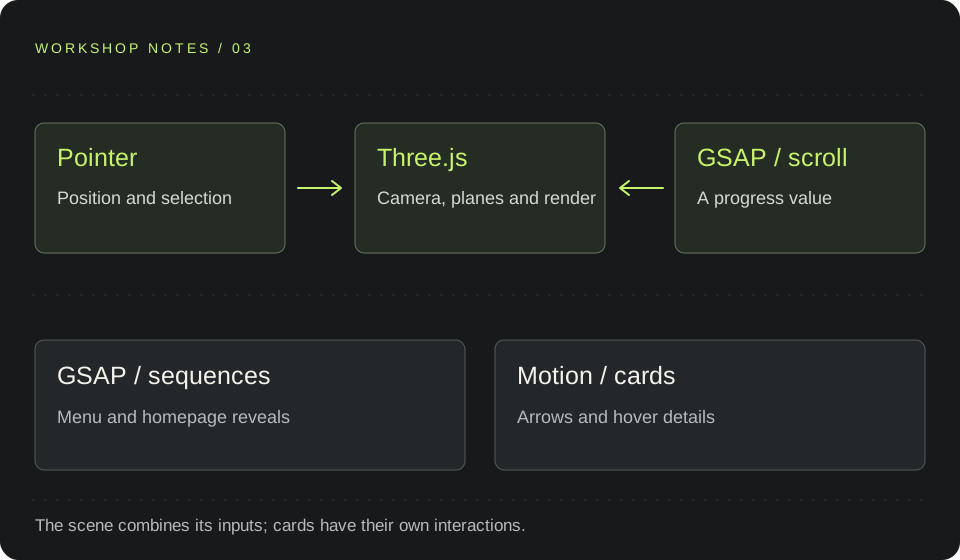
The separation also makes it easier to find the right place to make a change. If a screenshot turns too far, I go to the scene. If the menu takes too long to appear, I review its sequence.
What a screenshot does not show
After the visual work comes the job of switching off what is no longer needed.
The scene requests new frames while values still need to settle. Once they are stable, it stops. It also pauses when it leaves the screen or the browser tab is hidden.
Leaving the page cancels pending frames, disconnects observers and releases textures, geometries and materials. Image loading also accounts for someone leaving before it finishes.
None of that improves a screenshot of the hero. It is still part of making the effect work within a page that people visit and leave.
When the scene does not start
The same three screenshots also exist as an HTML composition. That is the alternative if the scene is unavailable. A preference for reduced motion prevents the 3D hero from starting.
The homepage text and links remain available. Animation can change how the projects are presented without becoming a requirement for finding out what they are.
I still need to measure the behavior on more devices. I do not have an FPS figure to present here. What I can describe is the specific adjustment I made: less scaling, a small turn and a response that no longer needs all the attention.
The part I would keep from this process is returning to the browser to see the whole effect. A scale value says little until it sits alongside the heading, the other images and the movement of the cursor.
You can see it on the homepage. In the next entry, I want to look at something much smaller: the clock and what happens when the weather stops responding.
AN IDEA TO SHARE