
I wanted to open TARS and find my tasks, settings and agenda without signing in to use those features. That intention influences several architecture decisions.
Local storage involves more than selecting a database. I also need to consider format changes, failed writes and data from older versions.
This third entry looks at how the data is distributed and the limits of calling an application local-first.
Give each type of data a clear home
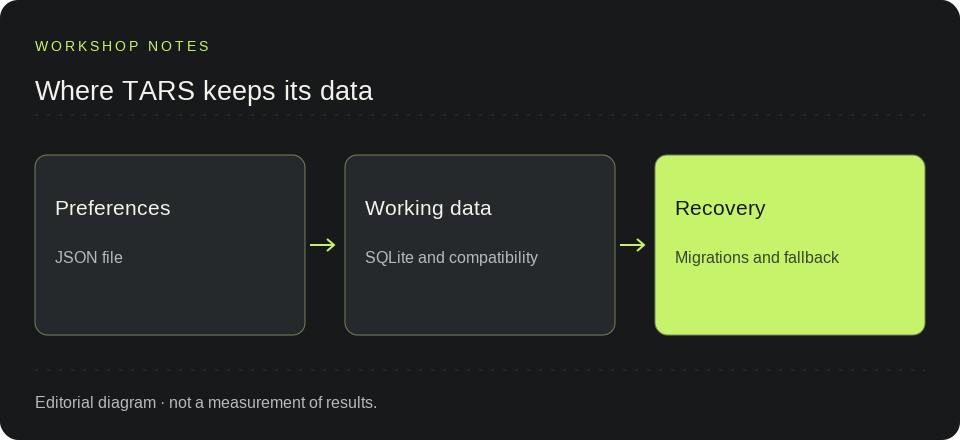
Configuration lives in a JSON file in TARS’s data directory. The Rust backend opens SQLite, which stores tasks, notes and agenda data among other entities.
Not everything has moved into one store. Productivity code retains backups and compatibility with localStorage; calendar events in that part of the application still persist there. Those events are distinct from the schedule engine’s SQLite entities.
I need to explain that distribution. Saying “everything is in SQLite” would simplify the story by describing a different application.
Change the structure without starting over
The database records applied migrations and checks the version before running pending ones. That lets the schema evolve without treating every launch as a fresh installation.
The connection enables foreign keys and WAL mode. WAL uses a separate write log and has consequences for concurrency and auxiliary files, as described in the SQLite documentation.
I do not treat that as a promise of no locking or automatic recovery from every failure. The write mode is one part of the strategy; complete behavior requires its own checks.
Take care of small files too
Settings look simple until a write is interrupted. The implementation prepares a temporary file and then attempts to replace the destination instead of truncating the current configuration first.
When loading corrupt JSON, the code attempts to preserve it under another name and uses defaults. That leaves a chance to inspect the previous file.
This is intended behavior in the implementation, not a guarantee against every disk, permission or process failure. Those scenarios deserve specific tests.
Distinguish a backup from the primary source
When loading tasks and notes, the application tries SQLite. It also supports migration from earlier localStorage data where applicable and a fallback when the backend is unavailable.
Compatibility helps during a transition, but adds questions: where did a value come from, when was it copied and which state is current?
The interface needs to preserve that distinction even when someone only sees the same task list. Changing storage should not silently turn an empty list into lost information.
Local does not mean every feature stays offline
The core features described here do not require a cloud account. The optional Gmail integration can make mail connections when configured.
I prefer to explain that scope rather than call every application option “offline.” I also distinguish local system metrics from usage analytics sent to a server.
Where data lives matters, but does not by itself establish encryption or a complete security audit.
Be able to return to my work
The organizing intention is to find my work when I reopen TARS. Supporting that requires persistence, validation and a recovery path I can inspect.
This series moved from windows and clicks to periodic work and then to lasting data. These are different parts of one application: how it occupies the desktop, when it works and what it keeps after closing.
The TARS project page gives an overview. Here I wanted to focus on decisions a panel screenshot cannot fully explain.
AN IDEA TO SHARE